


- Walking Into the Dojo
- The Belt System: Why They're Called Ninjas
- A Typical Session, Step by Step
- Beyond the Screen: 3D Printing, Robotics, and AI
- Awards, Prizes, and Celebrating Progress
- The Sensei Relationship
- Real Projects Kids Build
- Is This Right for Your Kid This Summer
- Map of Code Ninjas Locations in Metro Vancouver
This is a sponsored article produced in partnership with Code Ninjas.
Summer is when a lot of Metro Vancouver parents start asking the same question: what actually happens during one of these coding sessions everyone keeps recommending? The marketing language is easy to find. What’s harder to find is a plain, walk-through account of what a kid does for an hour inside the dojo, what they walk out with, and whether “coding class” is even the right way to describe it.
We spent time observing sessions at Code Ninjas locations across Vancouver to answer exactly that. Below is a behind-the-scenes breakdown of a typical visit, from check-in to the moment a kid finally gets their game to run without crashing.
Code Ninjas – Behind the Scenes: Read the new article in our blog: https://t.co/XYAU4Xao0e pic.twitter.com/gOMKzhAzJV
— Active Vancouver (@ActiveYVR) July 6, 2026
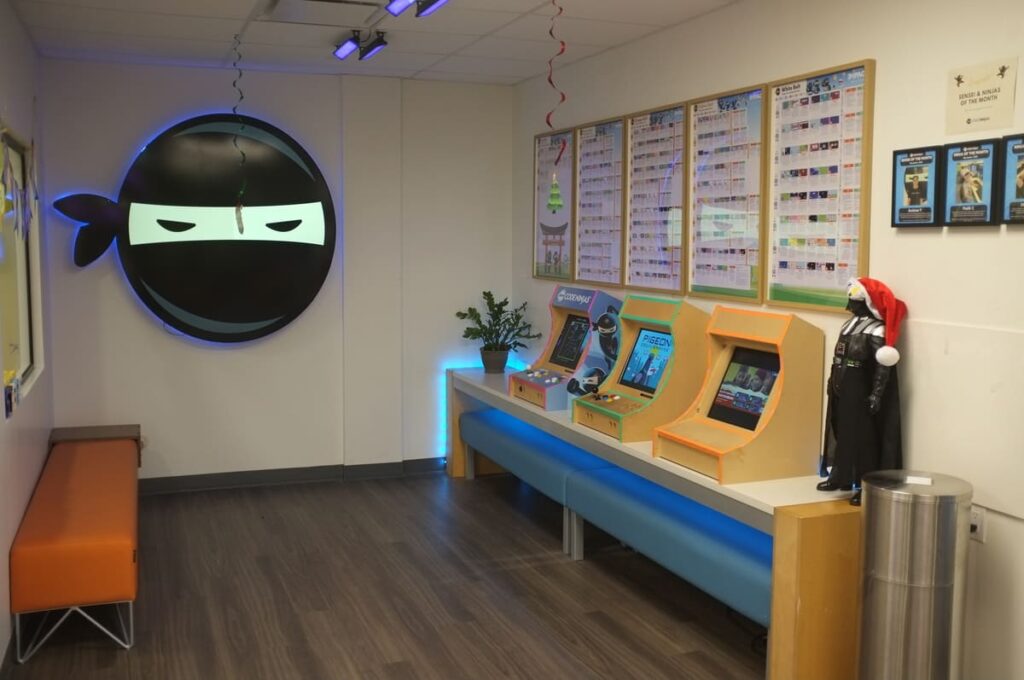
Walking Into the Dojo
Code Ninjas calls its classroom space a Dojo, and the naming isn’t just branding. Kids don’t sit in rows facing a whiteboard. Instead, small clusters of students work at individual stations, each on their own project, while a Sensei (the term Code Ninjas uses for its instructors) circulates and checks in one on one. Sessions run in small groups rather than large classes, so a Sensei might be working with six or eight kids at a time, each at a different stage of a different project.
The self-paced structure is the first thing that surprises parents who expect a traditional classroom. Nobody is following a shared lesson plan on a projector. A returning student might be deep into a JavaScript project while the kid at the next station is still dragging blocks together in a beginner interface. Both are doing “coding class” at the same time, just at different points on the same path.
The Belt System: Why They’re Called Ninjas
The naming convention runs all the way through the program. Kids progress through a series of coding belts, similar in spirit to a martial arts belt system, which is where the “Ninjas” name comes from. Each belt represents a jump in both the programming language being used and the complexity of the projects a student is expected to build.
| Belt Stage | What Kids Are Learning | Tools Used |
|---|---|---|
| White & Yellow | Core coding logic and sequencing | Block-based coding (Microsoft MakeCode) |
| Intermediate belts | Real syntax, debugging, problem solving | JavaScript |
| Advanced (road to Black Belt) | Original video game development | Unity, the same engine used by professional studios |
This progression matters for the transparency angle parents usually care about most: a coding belt isn’t a participation sticker. Moving from block-based coding into actual JavaScript syntax, and eventually into a professional game engine, means the belts track a genuine skill curve rather than just attendance.
Progress is tracked through Code Ninjas’ own learning platform, called IMPACT, which was built in partnership with Microsoft. It gives kids live feedback as they work and gives parents visibility into exactly which skills their child has picked up and where they’re headed next.
A Typical Session, Step by Step
A session usually opens with a quick check-in at a kiosk or with a Sensei, who pulls up where the student left off in IMPACT. From there:
The student reviews their previous project and picks up any unfinished work. Because everything is self-paced, there’s no catching up to do if a session was missed the week before.
The Sensei introduces the next concept tied to the student’s current belt, usually framed as a small challenge rather than a lecture. A Yellow Belt kid might be asked to make a character jump on command; a JavaScript-level student might be debugging a scoring system that isn’t counting correctly.
The student works independently, with the Sensei rotating through stations to answer questions, unstick a bug, or nudge a kid toward the next idea rather than handing over the answer outright. This is deliberate: the model is built around guided discovery, not dictation.
Near the end of the session, the Sensei checks the work against the belt’s requirements and logs progress in IMPACT, which is also what determines when a student is ready to test into the next belt.
Code Ninjas – Behind the Scenes: Read the new article in our blog: https://t.co/XYAU4Xao0e pic.twitter.com/TsYXqqR33b
— Active Vancouver (@ActiveYVR) July 6, 2026
Beyond the Screen: 3D Printing, Robotics, and AI
The “coding class” label undersells how much of the curriculum happens away from a keyboard, especially during the summer camp season. Camp weeks are typically built around a rotating set of STEM modules layered on top of the core coding track, and they commonly include:
3D printing, where kids design a simple object digitally and then watch it get physically produced, connecting the abstract idea of a design file to a tangible result.
Robotics builds using LEGO-based kits, which introduce hardware logic (sensors, motors, sequencing) alongside the software side kids are already learning in the Dojo.
Introductory AI development modules, which give older kids a first, simplified look at how machine learning concepts fit into the tools they’re already using.
Creative design challenges that pull in Minecraft or Roblox-style project themes, since kids are often more motivated to debug code when the payoff is a game world they already recognize.
For a parent trying to decide between a pure coding camp and a broader STEM camp, this is the practical distinction: the belt curriculum is the constant, and the camp modules (3D printing, robotics, AI) rotate in as enrichment on top of it.
Awards, Prizes, and Celebrating Progress
Motivation is treated as seriously as curriculum. Testing into a new belt is a recognized event, not a quiet backend update, and kids are acknowledged in front of their peers when it happens. Beyond belt promotions, Code Ninjas’ IMPACT platform tracks hundreds of individual achievements a student can unlock along the way, which gives kids frequent, smaller wins between the bigger belt milestones.
Some locations also run birthday party packages built around the same coding activities, and camp weeks often close with a small showcase where kids demo the game or project they built to parents at pickup. For a lot of families, that final demo is the first time they see, in concrete terms, what their kid has actually been doing all week.
The Sensei Relationship
Parent reviews of Code Ninjas locations across Metro Vancouver consistently circle back to the same theme: kids talk about their Sensei by name, and the relationship reads more like a mentor than an instructor delivering a curriculum. Because the model is one-on-one check-ins within a small group setting, rather than one instructor lecturing a full class, a Sensei has room to notice when a specific kid is bored, stuck, or ready to be pushed further, and adjust the challenge in the moment.
That structure also means a shy or younger kid isn’t competing for attention against a room of 25 other students. The Dojo format keeps the group energy (kids do notice and get excited about what their neighbours are building) without the class also having to move at one shared pace.
Real Projects Kids Build
By the intermediate and advanced belts, students aren’t working from a fixed template; they’re building original games with their own mechanics, characters, and rules. A common example is a student building a simple platformer, starting with basic movement, then layering in scoring, obstacles, and eventually a win condition, entirely through their own iteration and debugging. Advanced students working in Unity are building projects structurally similar to early-stage professional games, using the same engine studios use.
Is This Right for Your Kid This Summer
Code Ninjas runs both an ongoing after-school belt program and dedicated summer camps at its Metro Vancouver locations, including Vancouver East and Vancouver West Side, with additional locations across the region including North Vancouver. Programs are generally aimed at kids ages 5 to 14, and the drop-in, self-paced structure means new students can start mid-summer without being behind.
If your kid is the type to ask a lot of “how does this actually work” questions, or gets more excited about building something than being told about it, the Dojo format tends to be a good fit. The belt system gives them a visible sense of progress, the Sensei model keeps the support personal even in a group setting, and the 3D printing, robotics, and AI modules mean a coding-curious kid still gets a broad STEM summer rather than a narrow one.
For more Metro Vancouver summer programs and camps for kids, browse our full Summer Camps guide on ActiveVancouver.ca.